
Introduction
In today’s digital world, PDF files are widely used for sharing documents, reports, eBooks, invoices, and official records. While PDFs are excellent for maintaining formatting and security, they can be difficult to edit or extract content from. This is where a PDF-to-text extractor becomes an essential tool.
A PDF to Text Extractor allows users to convert PDF files into editable and readable text format instantly. Instead of manually typing content from a PDF, this tool automatically extracts text with high accuracy, saving time and effort. Whether you are a student copying notes, a professional editing reports, or a business handling large volumes of documents, this tool simplifies your workflow.
Modern tools in 2026 are faster, smarter, and more efficient than ever before. With advanced algorithms and improved accuracy, a PDF to Text Extractor ensures that users get clean and structured text output without losing important data.
What is a PDF to text extractor?
A PDF to Text Extractor is an online or software-based tool that extracts text content from PDF files and converts it into editable formats such as plain text.
Instead of dealing with locked or non-editable PDF documents, users can simply upload a file and get all the textual content extracted within seconds.
Key Capabilities
- Extract text from scanned or digital PDFs
- Convert PDF content into editable format
- Preserve structure and readability
- Handle large documents efficiently
This makes the tool highly useful across different industries and use cases.
Why You Need a PDF to Text Extractor in 2026
With the growing use of digital documents, extracting information quickly has become a necessity.
Increasing Use of PDF Files
PDFs are commonly used for:
- Academic materials
- Business reports
- Legal documents
- eBooks and guides
However, editing these files directly is not always possible.
Time-Saving Solution
Manually copying text from PDFs is slow and inefficient. A PDF to Text Extractor automates the process, saving hours of work.
Improved Productivity
Professionals can focus on important tasks instead of wasting time on repetitive data entry.
Better Data Accessibility
Extracted text can be reused, edited, and shared easily.
📄 PDF to Text Extractor
Upload any PDF — extract all text instantly. Runs 100% in your browser. Nothing is sent to any server.
Key Features of a Powerful PDF to Text Extractor
A high-quality PDF to text extractor in 2026 comes with advanced features designed for speed and accuracy.
Instant Text Extraction
- Upload PDF and get results instantly
- No waiting time
- Fast processing even for large files
High Accuracy
- Extracts text without errors
- Maintains original content integrity
- Reduces need for manual corrections
Supports Multiple PDF Types
- Scanned PDFs
- Image-based PDFs
- Text-based PDFs
Clean Output Format
- Removes unnecessary formatting
- Provides readable text
- Easy to copy and edit
User-Friendly Interface
- Simple upload process
- Easy navigation
- Suitable for beginners
Cross-Device Compatibility
- Works on mobile, tablet, and desktop
- Accessible anytime, anywhere
How a PDF to Text Extractor Works
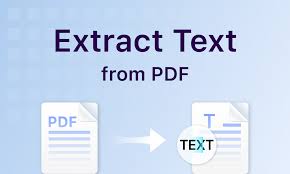
A PDF to Text Extractor uses advanced technologies to process and extract text.
Step-by-Step Process
- Upload PDF File
User selects and uploads the PDF document. - Processing Phase
The system scans the file and identifies text elements. - Text Extraction
Content is extracted using built-in algorithms or OCR (Optical Character Recognition). - Output Generation
The extracted text is displayed in a clean and editable format.
Understanding OCR Technology
Modern PDF to text extractor tools often use OCR technology to improve accuracy.
What is OCR?
OCR (Optical Character Recognition) is a technology that converts images or scanned documents into editable text.
Benefits of OCR
- Extracts text from scanned PDFs
- Recognizes different fonts and styles
- Improves accuracy in complex documents
Step-by-Step Guide to Using the Tool
Using a PDF to text extractor is simple and requires no technical skills.
Step 1: Upload Your PDF
Click on the upload button and select your file.
Step 2: Start Extraction
Click the extract button to begin processing.
Step 3: Wait for Processing
The tool analyzes the document.
Step 4: Copy or Download Text
Once complete, copy or download the extracted text.
Benefits of Using a PDF to Text Extractor
Saves Time
- Eliminates manual typing
- Processes documents instantly
Reduces Errors
- Ensures accurate text extraction
- Minimizes human mistakes
Improves Efficiency
- Speeds up document handling
- Enhances workflow
Easy to Use
- No technical knowledge required
- Simple interface
Free and Accessible
- Many tools are available online
- No installation required
Use Cases of PDF to Text Extractor
This tool is widely used across different industries.
Students
- Extract notes from PDFs
- Copy content for assignments
- Study more efficiently
Professionals
- Convert reports into editable format
- Extract data from documents
- Save time on repetitive tasks
Businesses
- Process invoices and records
- Manage large data efficiently
- Automate workflows
Researchers
- Extract data from research papers
- Analyze content quickly
Advantages Over Manual Methods
Manual text extraction is slow and inefficient compared to automated tools.
Speed Comparison
- Manual: Time-consuming
- Tool: Instant
Accuracy Comparison
- Manual: Error-prone
- Tool: Highly accurate
Effort Comparison
- Manual: Requires typing
- Tool: One-click solution
Why PDF Tools Are Trending in 2026
The demand for PDF tools has increased due to digital transformation.
Digital Documentation Growth
More businesses and institutions use PDFs.
Remote Work Culture
People need quick access to editable content.
Automation Trends
Tools help automate repetitive tasks.
Increased Productivity Needs
Users prefer fast and efficient solutions.
SEO Benefits of Adding PDF Tools to Your Website
Adding a PDF to the Text Extractor tool can significantly improve website performance.
High Search Demand
Many users search for PDF tools daily.
Increased Traffic
Tools attract organic visitors.
Better Engagement
Users spend more time interacting with tools.
Higher Rankings
Search engines prefer useful content.
Tips for Best Results
To get the best output from a PDF to Text Extractor:
- Use clear and high-quality PDFs
- Avoid heavily distorted documents
- Check extracted text for formatting
- Use OCR-supported tools for scanned files
Common Challenges and Solutions
Problem: Poor Text Formatting
Solution: Use advanced tools with formatting support
Problem: Scanned PDFs Not Working
Solution: Use OCR-enabled extractor
Problem: Large File Size
Solution: Use optimized tools that support big files
Frequently Asked Questions
What is a PDF to text extractor?
It is a tool that converts PDF files into editable text format.
Is the tool accurate?
Yes, modern tools provide highly accurate results using advanced algorithms.
Can it extract text from scanned PDFs?
Yes, with OCR technology, it can extract text from images and scanned files.
Is it free to use?
Many online tools are free and easy to access.
Who can use this tool?
Students, professionals, businesses, and researchers.
Conclusion
In 2026, managing digital documents efficiently is more important than ever. A PDF to Text Extractor is a powerful tool that simplifies the process of converting PDF files into editable text. It saves time, reduces errors, and improves productivity across various fields.
Whether you are a student extracting notes, a professional handling reports, or a business managing documents, this tool provides a fast and reliable solution. Instead of struggling with manual methods, using a PDF to Text Extractor ensures accuracy and efficiency.
By integrating this tool into your workflow, you can streamline document processing and focus on more important tasks. As digital transformation continues to grow, tools like this will remain essential for modern users.
Want to know about “Amazing Hex, Binary and Octal Converter in 2026“?